You can request a refund from the My Tickets page if the event organiser allows refunds and you are within the refund timeframe. If refunds aren't available, you'll need to contact the organiser directly.
Purchased Secure My Refund? Your refund request is handled through the Secure My Refund provider — not through the event organiser. See: How to submit a Secure My Refund request.
Event cancelled? Different rights may apply. See: Ticket refunds and cancellations.
Before you start — check your eligibility
Each event has its own refund conditions set by the organiser. Find the conditions on:
- The event page, and/or
- Your confirmation email
If refunds are allowed and you are within the timeframe, follow the steps below. If not, skip to What to do if a refund isn't available.
Important — non-refundable fee: A 1.5% merchant and administration fee is deducted from all refunded amounts. This applies unless the organiser explicitly grants a full refund under their policy.
Steps to request a refund
Step 1 — Go to your tickets. Go to the My Tickets page at stickytickets.com.au.
Access your order by either:
- Logging into your account, or
- Searching as a guest using one of the following:
- Order number and email address — enter the order number from your confirmation email and the email address used at checkout, then click Search.
- Credit card details — enter the first 6 digits, last 3 digits, and transaction date of the card used at checkout, then click Search.
Step 2 — Fill out the refund form
- Once you have located your order, click the Refund Request button.

- Complete the refund form:
- Refund reason — select from the list
- Tickets — choose which tickets to include in the request
- Message — add any additional details for the organiser
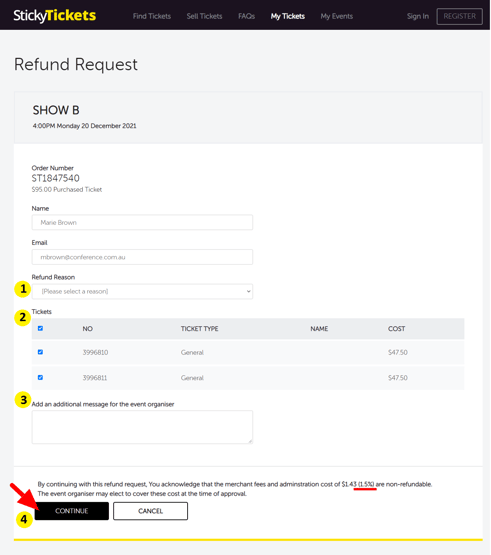
- Click Continue to review your request.
Step 3 — Review and submit
- Review the summary of your request.
- Click Confirm to send your request to the organiser.
What happens after you submit
- Your request is sent to the event organiser for review.
- The organiser will approve or decline your request.
- You will receive an email with the outcome.
- You can check the status of your request at any time on the same My Tickets page.
- If approved, allow 5–7 business days for the refund to appear on your original payment method.
Keep in mind: Refunds are not guaranteed and depend on the organiser's conditions and discretion. Response and processing times may vary.
What to do if a refund isn't available
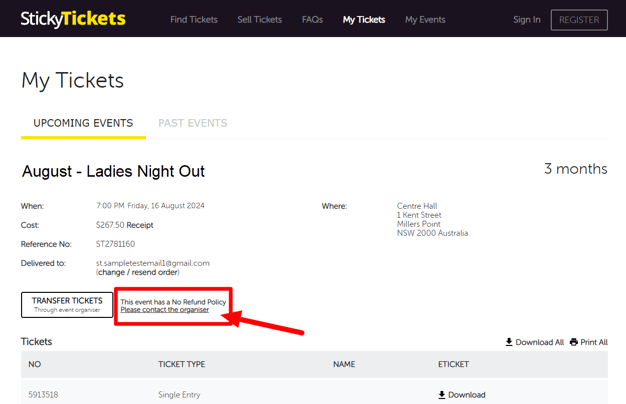
If you don't see a Refund Request button, or the event has a no-refund policy, contact the organiser directly to discuss your options.
See: How to contact the event organiser.
Most common SCENARIOS and questions
I can't see a Refund Request button on my order.
-
The Refund Request option only appears when the organiser has enabled refunds and you are within the eligible timeframe. Check the event page for the refund conditions, then contact the organiser directly if you need to discuss your options.
My refund request was declined.
If the organiser declines your request, you will be notified by email. Contact the organiser directly to ask about alternative options. If you believe your consumer rights have been breached — for example, if the event was cancelled — see: Ticket refunds and cancellations.
I haven't received a response from the organiser.
-
If you haven't received a response within 2–3 business days, contact our support team with your order details and a summary of your request — we'll assist where possible.
How do I check the status of my refund request?
-
Return to the My Tickets page and locate your order. The current status of your refund request is shown there.
Can I cancel a refund request after submitting it?
-
Yes — return to the My Tickets page and cancel your request from there. If you are having trouble, contact our support team for assistance.
Will the booking fee be refunded?
-
A 1.5% merchant and administration fee is deducted from all refunds. If the organiser's conditions allow a full refund, the booking fee will also be included. The 1.5% fee is non-refundable in all cases.
How long does a refund take to arrive?
-
Once the organiser approves your request, allow 5–7 business days for the refund to appear on your original payment method. If it hasn't arrived after this time, contact our support team with your order details.
Can I request a refund for only some of the tickets in my order?
-
Yes — in Step 2, you can select which tickets to include. You don't have to refund all tickets in the order.
Need more help?
If you're still having trouble, contact our support team.