If you selected Secure My Refund when purchasing your tickets, you can submit a refund request if you are unable to attend due to eligible unforeseen circumstances.
Not sure if you purchased Secure My Refund? Check your receipt or confirmation email for a "Secure My Refund Fee" line item. If it's there, you have protection on this order.
Before you start — check your eligibility
Secure My Refund covers unforeseen circumstances out of your control that prevent you from attending. Eligible reasons include, but are not limited to:
- Sudden illness or injury (you or an immediate family member)
- Pre-existing medical condition that changes unexpectedly
- Bereavement (death of an immediate family member)
- Accident or emergency
- Jury service or court summons
- Mechanical breakdown of the vehicle is taking you to the event
- Adverse weather (with government agency travel warnings)
- Scheduled airline failure or significant flight disruption
- Public transport termination
- Home emergency
- Government travel ban
- Relocation for work (for a period of more than 3 months)
- Theft of tickets (confirmed by police report)
- Changes to examination dates
- Armed forces or emergency services recall
- Other emergency circumstances (at Sticky Tickets' discretion)
For the full eligible and ineligible reasons and conditions, see the Secure My Refund terms and conditions.
IMPORTANT: Secure My Refund does not cover change of mind, communicable diseases (including COVID-related absences or lockdowns), or circumstances that were foreseeable at the time of purchase. If you are unsure whether your reason qualifies, review the terms and conditions before submitting.
What to have ready before you apply
- Your order number or the card details used at checkout
- Your bank account details — refunds are paid directly to a nominated bank account, not back to your original payment method
- Supporting documentation relevant to your reason, but not limited to (see table below):
Documentation required by reason
| REASON | DOCUMENTATION NEED |
| Illness or Injury | Medical certificate confirming the illness/injury, the date it occurred, and that it prevented attendance |
| Adverse Weather | Travel warning from a government agency or confirmation of route closures |
| Mechanical Breakdown | Call-out note from your breakdown recovery service |
| Public Transport Failure | Notice of termination or disruption from the transport company |
| Pre-existing Medical Condition | Medical certificate confirming the condition, the date it changed, and that it prevented attendance |
| Bereavement | Copy of the death certificate |
| Flight Disruption | Copy of your airline ticket and the cancellation notice from the airline |
| Relocated for Work | A letter from your current employer stating the date you were notified of the relocation or business travel, and the period for which you will be away. |
| Emergency circumstances | Any evidence requested by the Sticky Tickets Refunds Team |
For documentation requirements for all other eligible reasons, see the Secure My Refund terms and conditions.
Step 1 — Access your order
- Go to the My Tickets page at stickytickets.com.au.
- Access your order by either:
- Logging into your account, or
- Searching using your order number and email address, or credit card details (first 6 digits, last 3 digits, transaction date)
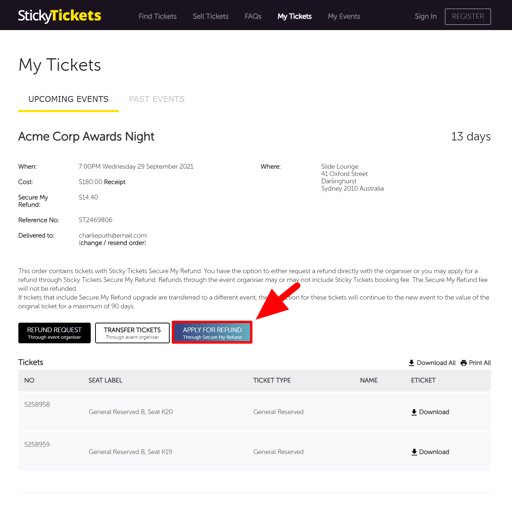
- Once you have found your order, click Apply for Refund (through Secure My Refund).
Step 2 — Complete the application form
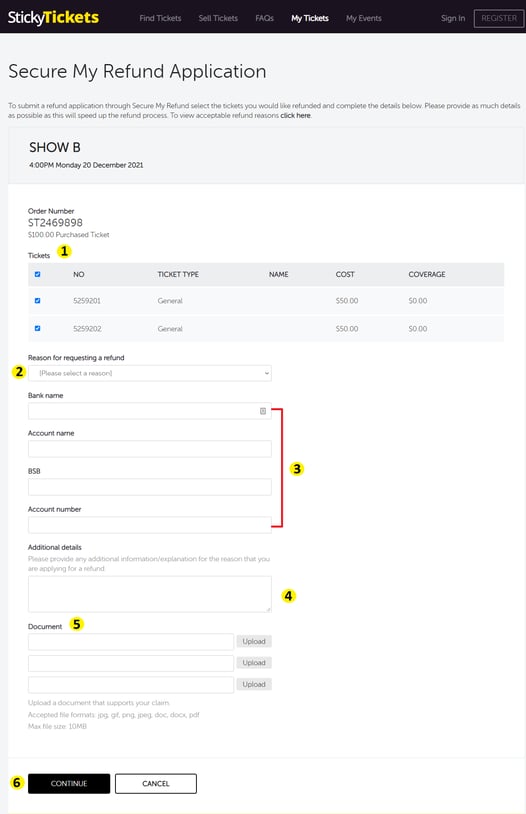
- Select the ticket or tickets you want refunded. You can apply for a partial refund if only some tickets are affected.
- Choose your reason for the request from the list provided.
- Enter your bank account details. Your refund will be paid to this account — not back to your original payment method. Double-check that the details are accurate before continuing.
- Add any additional information relevant to your application.
- Upload your supporting documentation (accepted formats: image, PDF, DOC).
- Click Continue.
Step 3 — Review and submit
-
Review all your application details carefully — once submitted, the application cannot be edited.
-
Click Submit to send your request.
What happens after you submit
- Your application status will show as Pending.
- Your application will be reviewed against the Secure My Refund terms and conditions. You should receive an update about this within 1–2 business days.
- You can return to the same My Tickets page at any time to check your application status.
- If approved, the refund will be paid to the bank account you provided.
If your application is not approved
You will be notified by email with the reason. If you believe the decision is incorrect or want to discuss your options, contact our support team with your application details, and we will assist where possible.
Most common questions and situations
I can't find the Apply for Refund button.
-
The button only appears if Secure My Refund was purchased with your ticket and you are within 30 days of the event date. Check your receipt for a "Secure My Refund Fee" line item. If protection was included and the button still isn't showing, contact our support team.
My application has been pending for more than 2 business days.
-
Contact our support team with your application reference number and we'll investigate.
I made an error in my banking details.
-
Once submitted, applications cannot be edited. Contact our support team immediately with your application details so we can advise on next steps.
My supporting documents won't upload.
-
Check that your file is in an accepted format (image, PDF, or DOC). If the problem continues, email your documents directly to support@securemyrefund.com.au or contact our support team.
Can I submit a request after the event has already taken place?
-
Yes. You can submit a Secure My Refund request for up to 30 days after the scheduled event date.
Can I get a refund for only some of the tickets in my order?
-
Yes. During the application, you can select which tickets to include. You don't need to request a refund for all tickets.
Will the booking fee be refunded?
-
Yes. If your request is approved, the full amount paid — including the booking fee — will be refunded. The Secure My Refund fee itself is non-refundable.
I didn't purchase Secure My Refund. Can I still get a refund?
-
Any refund will be subject to the event organiser's refund conditions. See: Ticket refunds and cancellations.
What is the maximum refund I can receive?
-
The maximum refund through Secure My Refund is $1,000 per order, or the total ticket value — whichever is less.
Does Secure My Refund cover events cancelled by the organiser?
-
No. If the organiser cancels or postpones the event, your refund comes from the organiser — not through Secure My Refund. The Secure My Refund fee is non-refundable in this case.
Need more help?
If you have questions about your application or need assistance, contact our support team.