Purchased tickets without creating an account? Guest purchases don't require a login — you won't have a Sticky Tickets password. Access your tickets using your confirmation email or look up your order on the My Tickets page using your order number and email address. No login needed.
Step 1 — Check your email address and password
Before anything else, verify the basics:
- Check that your email address is spelled correctly
- Make sure Caps Lock is not on
- Type your password manually rather than pasting it — some browsers alter copied text
- Try a different browser (Chrome, Firefox, Safari) or clear your current browser's cache and cookies
How to clear your browser cache: Press Ctrl + Shift + Delete (Windows) or Cmd + Shift + Delete (Mac), select cached images and cookies, and click Clear. Then try logging in again.
Step 2 — Reset your password
If you've forgotten your password or the one you're entering isn't being accepted:
- Go to the Sticky Tickets login page and click Forgot Password.
- Enter the email address registered to your account.
- Check your inbox for a reset email and follow the link to set a new password.
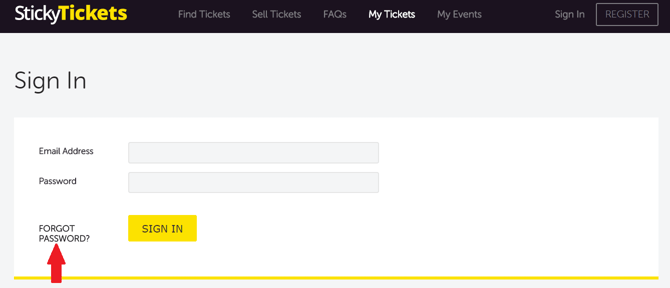
Reset email didn't arrive?
- Check your spam, junk, Promotions, and Updates folders for an email from Sticky Tickets.
- Make sure you're entering the exact email address you registered with.
- Reset emails typically arrive within 5 minutes — if it's been longer, request a new one.
- Still nothing? Contact our support team.
Reset link not working?
- Reset links expire after a short time — if yours has expired, return to the Forgot Password page and request a new one.
- Open the link in the same browser you requested it from.
- Each link can only be used once — if you've already clicked it, request a fresh one.
- Still not working? Contact our support team.
Step 3 — Account temporarily locked
Your account is temporarily locked after several consecutive failed login attempts. This is a security measure and will not unlock on its own.
- Do not continue attempting to log in — further failed attempts will not help.
- If you're unsure of your password, use the Forgot Password link rather than guessing.
- Contact our support team to unlock your account. Include your registered email address and name.
Step 4 — No longer have access to your registered email?
If you can't receive the password reset email because you no longer have access to the email address on your account, contact our support team. To help us verify your identity and update your email, include:
- Your full name
- Your current registered email address
- The new email address you'd like to use
- A copy of a valid photo ID (e.g. driver's licence or passport)
Still unable to log in?
Contact our support team and include:
- Your registered email address and name
- A screenshot of the error message (if available)
- The device and browser you're using
Most common questions
My password reset link says it's invalid or expired — what do I do?
-
Reset links expire after a short time and can only be used once. Go back to the Forgot Password page and request a new link.
I reset my password, but still can't log in — what's happening?
-
Clear your browser cache and cookies, then log in again with your new password typed manually. If the problem persists, try a different browser or device.
How long does an account lockout last?
-
Account lockouts don't resolve automatically — you'll need to contact our support team to have your account unlocked. Include your registered email address and name when you get in touch.
I think someone else may have accessed my account — what should I do?
-
Reset your password immediately using the Forgot Password link, then contact our support team to report the issue.
Can I log in with a different email address?
-
Your account is tied to the email address you registered with. If you no longer have access to that email, contact our support team, and we'll update your account email. You'll need to provide a copy of a valid photo ID so we can verify your identity.
I purchased tickets, but I don't have a login — where do I go?
-
If you bought tickets without creating an account, you don't have a Sticky Tickets login. Access your tickets via your confirmation email or use the My Tickets page to look up your order with your order number and email address.
I changed my email address — how do I update my Sticky Tickets account?
-
Contact our support team with your full name, current registered email address, the new email address you'd like to use, and a copy of a valid photo ID. We'll update it for you.
Need more help?
If you’re still having trouble logging in, contact our support team.