Unpublishing your seating plan removes it from your event page temporarily. Ticket purchasers will not be able to see or select seats while the plan is unpublished. You can republish it at any time.
Important: Reserved tickets will not be displayed on your event page while the seating plan is unpublished. Existing seat assignments for tickets already sold are not affected.
How to unpublish your seating plan
- Log in to your Sticky Tickets organiser account.
- Go to My Events and open the event with the seating plan.
- Click the Edit Event tab.
- Scroll down to the Seating Plan section and click the edit (pencil) icon to open the editor.
- In the right panel, click Unpublish.
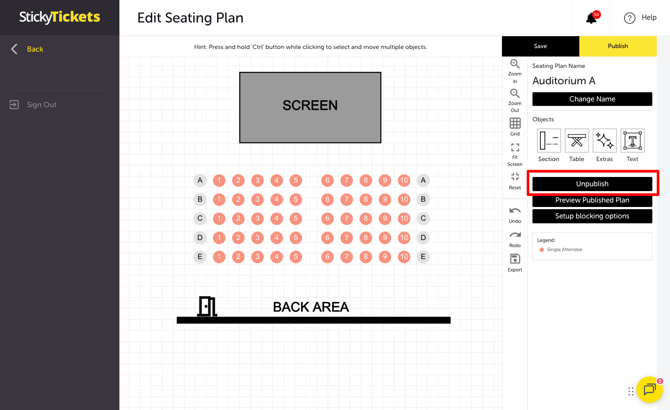
The seating plan is immediately hidden from your event page. The editor remains open so you can make changes.
What happens when you unpublish
| WHAT CHANGES | WHAT STAYS THE SAME |
|---|---|
| Seating plan no longer visible on event page | Existing seat assignments for sold tickets |
| Reserved tickets not displayed on event page | Ticket purchaser order records |
| Ticket purchasers cannot select new seats | Your seating plan layout and settings |
How to republish your seating plan
Once you've finished making changes, click Save, then click Publish in the right panel. The seating plan will be visible to ticket purchasers again immediately.
Most common scenarios and questions
Can I unpublish a seating plan if seats have already been sold?
-
Yes — you can unpublish at any time, even if tickets have been sold. Existing seat assignments are not cancelled or changed. Ticket purchasers who have already purchased seats retain their seats.
Will ticket purchasers be notified when the seating plan is unpublished?
-
No — ticket purchasers are not notified. They will simply see the seating plan as unavailable on the event page until it is republished.
How long can the seating plan stay unpublished?
-
There is no time limit. You can keep the plan unpublished for as long as needed and republish it whenever you are ready.
Can I sell tickets while the seating plan is unpublished?
-
Reserved seating tickets will not appear on your event page while the plan is unpublished. Ticket purchasers cannot select seats or purchase reserved tickets during this time.
Need more help?
If you need help unpublishing or republishing your seating plan, contact our support team.