You can access your e-ticket and receipt at any time from the My Tickets page, or directly from the links in your confirmation email.
Jump to your situation:
- I have a Sticky Tickets account → Path A
- I purchased as a guest → Path B
- Ticket not downloading or not found?
Path A — I have a Sticky Tickets account
- Go to stickytickets.com.au and click My Tickets at the top of the page.
- Click Sign In and log in with your email address and password.
- Find the event you need under your tickets list.
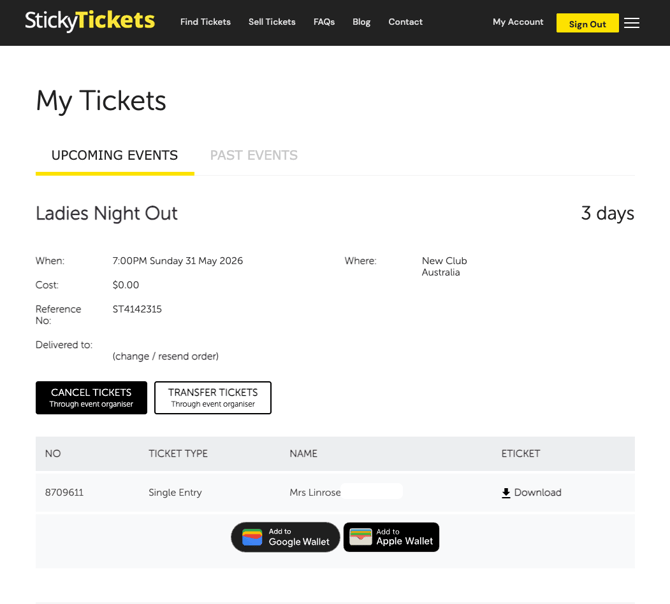
- Click on the order to open it. From here you can:
- Download your e-ticket as a PDF
- Download or print your receipt (paid events only)
- Add your tickets to Google Wallet or Apple Wallet
Path B — I purchased as a guest
- Go to stickytickets.com.au and click My Tickets at the top of the page.
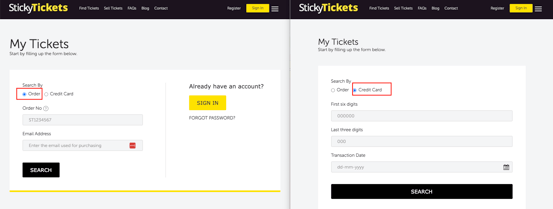
- Look up your order using one of the following methods:
-
Option 1 — Order number and email address
Enter the order number from your confirmation email, along with the email address used at checkout, then click Search.
Can't find your order number? Check your confirmation email — the order number is in the subject line and email body. If you can't locate it, contact our support team with your full name, the event name, and the email address you used at checkout.
-
Option 2 — Credit card details
Enter the following details from the card used at checkout, then click Search:
- First 6 digits of the card number
- Last 3 digits of the card number
- Transaction date as it appears on your bank statement
-
-
Once your order is found, you can:
-
- Download your e-ticket as a PDF and print it
- Download or print your receipt
-
Want to add your ticket to Apple or Google Wallet? Log in to or create a Sticky Tickets account — wallet access is available from the account view of My Tickets, or from the links in your confirmation email.
Also in your confirmation email
Your confirmation email contains a pdf copy of your e-ticket and receipt.
Most Common Situations and Questions
Order not found using order number and email?
-
Double-check the email address — it must exactly match the one used at checkout. If you're unsure, try any alternative email addresses you may have used. If the order still can't be found, contact our support team with your name, event name, and email address.
Credit card lookup not returning results?
-
Make sure the card details match the card used at checkout exactly. If you used a different card or a digital wallet (e.g. Apple Pay), try looking up your order number instead.
Ticket found but won't download or print?
-
Try a different browser or device. Make sure your browser allows PDF downloads. If the problem continues, contact our support team.
No e-ticket available for my event?
-
Not all events include e-tickets — this depends on the organiser's settings. If no e-ticket is available, your receipt will still be accessible. Contact the event organiser to confirm what you need to bring on the day.
No receipt showing?
-
Free events do not generate a receipt. If your event was paid and no receipt is showing, contact our support team with your order details.
I didn't receive a confirmation email?
-
Check your spam or junk folder. If it's not there, use Path B above to access your tickets directly using your order number or credit card details. If you still can't locate your order, contact our support team.
Can I access my ticket on my phone?
-
Yes. Open the My Tickets page on your phone's browser and follow Path A or Path B above. For the easiest event-day access, add your ticket to Google Wallet or Apple Wallet — it works offline too. See: Adding a ticket to Google or Apple Wallet.
Can I share my downloaded ticket?
-
Yes — download the PDF and forward it. Keep in mind that each ticket has a unique QR code. If the same QR code is scanned twice at the event, only the first scan will be valid.
I've lost my order number — how do I find my tickets?
-
Use the credit card lookup option in Path B above, or check your inbox for the original confirmation email from Sticky Tickets. If neither works, contact our support team with your name, event name, and email address.
Need more help?
If you're still having trouble downloading your tickets/receipt, contact our support team with your name, event details and email address