You can add a direct "Tickets" link to your Facebook Event, so attendees can go straight from Facebook to your Sticky Tickets event page to purchase.
NOTE: These steps reflect Facebook's interface at the time of writing. Facebook updates its layout periodically, so button names or steps may look slightly different when you go through this — the underlying process (adding a Ticket URL under Admission) should remain the same.
Step 1: Get your Sticky Tickets event URL
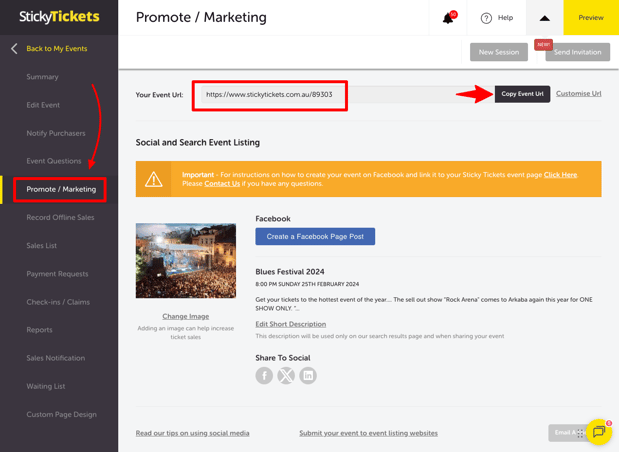
- Log in to stickytickets.com.au.
- Select your event.
- Go to Promote/Marketing in the left-hand menu.
- Copy your event's URL from this page.
Step 2: Add the link to your Facebook Event
If you already have the event created in Facebook,
- Go to your event on Facebook and select Edit.
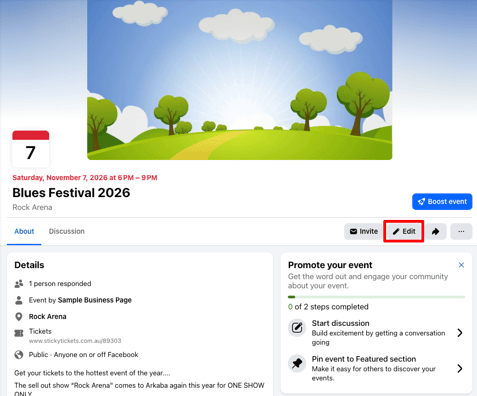
- Scroll to the Add Ticket section and paste your Sticky Tickets event URL into the Ticket URL field, then select Save.
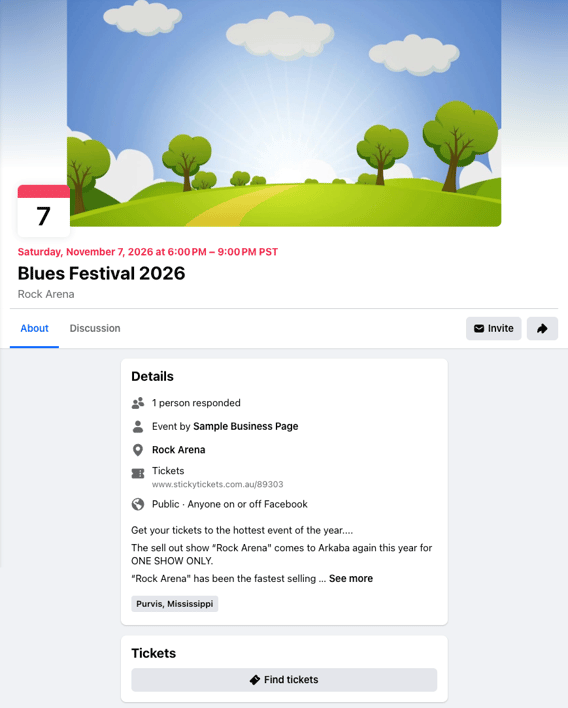
- Your Sticky Tickets link should now appear under Admission. Select Update to confirm.
- Attendees viewing your event on Facebook will now see a Tickets link that takes them to your Sticky Tickets event page.
Most common scenarios and questions
I can't find the Ticket URL field — what am I missing?
-
This field only appears once your event's Admission type supports an external ticket link. Check that you haven't selected an admission type like "Free" that doesn't include this option.
Does this work the same way for a Facebook Page event and a personal profile event?
-
The steps are the same, but you'll need management access to whichever Facebook Page or profile the event is created under.
Can I update the link later if my Sticky Tickets event changes?
-
Yes — go back into your Facebook Event's Edit screen and update the Ticket URL field under Admission at any time.
Need more help?
If you have any questions about linking your Facebook Event, contact our support team.