Why is this happening?
This error usually means one of the following:
- You've previously created a Sticky Tickets account with this email and may have forgotten
- You've purchased tickets as a guest using this email, which creates a guest profile in our system
- In rare cases, someone else may have registered with your email address
Use the scenarios below to find which one applies to you.
Scenario 1 — I've registered before but forgotten my password
What to do: Use the Forgot Password link to reset your password and regain access — no need to create a new account.
- Go to the Sticky Tickets login page.
- Click the Forgot Password link below the sign-in form.
- Enter the email address you registered with.
- Check your inbox for a password reset email and follow the link to set a new password.
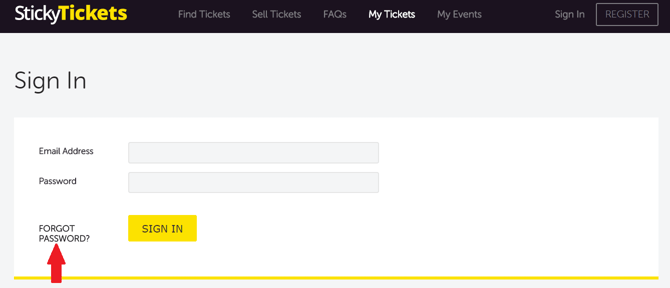
Reset email didn't arrive?
- Check your spam, junk, Promotions, and Updates folders.
- Make sure you're entering the correct email address — the one you originally registered with.
- Password reset links expire after a short time — if yours has expired, request a new one.
- Still nothing? Contact our support team.
Scenario 2 — I bought tickets as a guest and can't register with that email
When you buy tickets without creating an account, your email address is saved in our system as a guest profile. This means it can't be used to register a fresh account directly, but it can be activated as a full account.
Do you actually need an account? If you just want to view or download your existing tickets, you don't need to register at all. Use the My Tickets page to look up your order using your order number and email address — no login required.
If you do want a full member account, contact Sticky Tickets Support with your name and email address and let us know you'd like to use the same email address to register and have a Member account. Our team aims to respond within 1 business day.
Scenario 3 — I'm not sure if I already have an account
Use the Forgot Password flow to check. Go to the login page, click Forgot Password, and enter the email address you think you may have used.
- If an account exists, you'll receive a password reset email — follow the link to regain access.
- If no account is found, contact Sticky Tickets Support with your name and email address and ask to confirm if you have an account with us.
Scenario 4 — I think someone else may have registered with my email
If you haven't created an account and haven't purchased tickets with this email, but are still seeing a registration error, contact our support team immediately. Include your full name and the email address in question. We'll investigate and secure the account.
Still unable to create an account?
Contact our support team and include the following so we can resolve it quickly:
- Your full name
- The email address you're trying to use
- Any ticket or event details linked to your account
- The exact error message you're seeing
Most common questions
I don't know which email address I used — how do I find out?
-
Check any old confirmation emails from Sticky Tickets in your inbox. You can also try the Forgot Password flow with a few different email addresses — if an account exists, you'll get a reset link. If you're still stuck, contact our support team with your name and the event name, and we'll locate your order.
I don't know if I have an account. How do I check?
-
Use the Forgot Password flow on the login page. Enter the email address you think you used — if an account exists, you'll receive a reset link. If not, you're free to register with that address.
I entered the wrong email address when buying tickets. Can I change it?
-
Yes. Contact our support team with your name, the event name, and both email addresses. We can locate your order, update the email address on file, and resend your confirmation.
Can I just register with a different email address instead?
-
Yes — if you'd prefer not to wait, you can register with a different email address. Keep in mind that any past purchases made under your original email address won't be linked to the new account automatically. Contact support if you'd like to consolidate them later.
Will my past guest ticket purchases appear in my account once I register?
-
No. Creating a new account will not automatically link tickets purchased as a guest before registration. Contact our support team to have past guest purchases linked to your account.
What's the difference between a guest profile and a full account?
-
A guest profile is created automatically when you buy tickets without registering. It holds your order details but doesn't let you log in. A full account lets you log in, view all your purchases, and manage your bookings.
Need more help
If you are still having trouble creating an account with Sticky Tickets, contact our support team.