When you create a new event, Sticky Tickets can automatically email past ticket purchasers from your previous events to let them know about it — no mailing list management or email writing required.
Who receives the invitation:
Only past ticket purchasers who:
-
Attended the event(s) you select
- You haven't exceeded the frequency limits set for your account
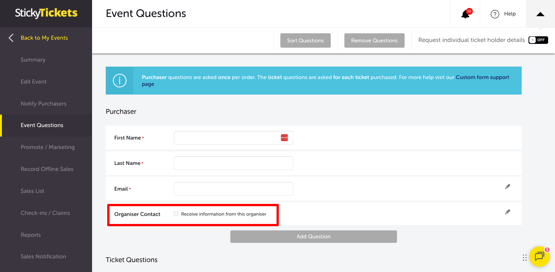
- Attendee opted to be contacted by the event organiser (question asked during booking process, using the default question)
If a purchaser attended more than one of the events you select, they'll still only receive one email.
Recipient cap: A maximum of 500 recipients per organiser, per event, can be invited using this feature.
How to set it up
- Go to the Promote/Marketing tab for your new event.
- Select Send Invitation.
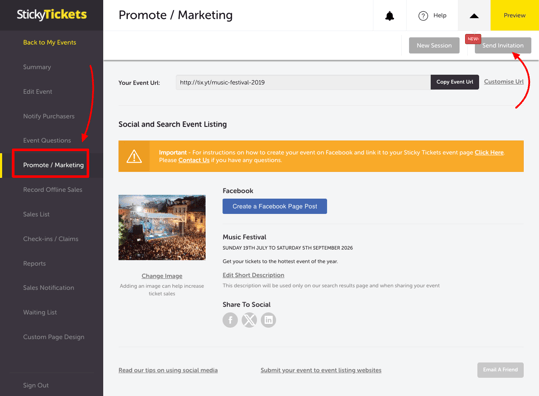
- Choose the date you want the invitation sent.
- Select which of your previous events to invite past purchasers from.
- Select Save Invitation.
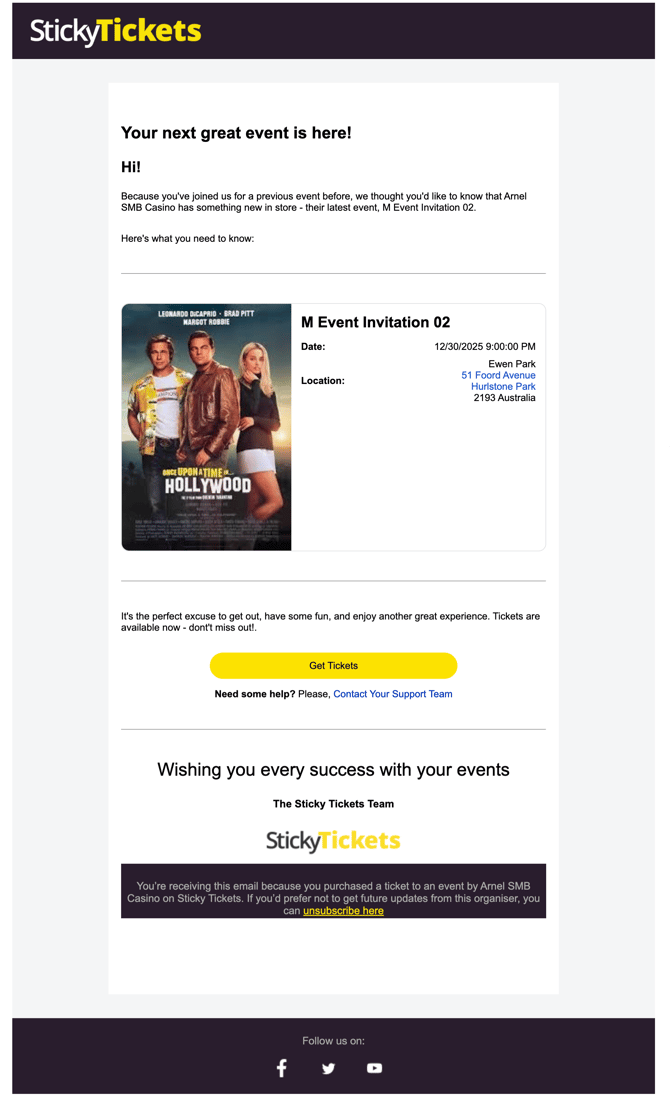
The email content itself can't be customised — but we recommend adding an image to your Image Gallery in the Event Description section, since this image is used in the invitation email. See our guide on adding or changing your event's thumbnail image.
Where to see if your invitation has been sent or is still scheduled
To check the status of an invitation, go back to the Promote/Marketing tab for the event you set the invitation up on, then select Send Invitation.
- Before the scheduled send date: this screen shows your current settings (send date and selected past events), which you can still adjust.
- After the invitation has been sent: this screen locks the settings and instead shows a summary — the date it was sent and how many recipients received it.
There's no single page that lists every invitation across all your events. Status is only checked per event, on that event's own Send Invitation screen — so if you've set up invitations on multiple events, you'll need to check each one individually.
Example of email invitation
MOST COMMON SCENARIO AND questions
Can I cancel a scheduled invitation before it sends?
-
You can adjust or remove your selections up until the scheduled send date. Once sent, the invitation can't be recalled or edited.
Where can I see which invitations have been sent or are scheduled to send?
-
Go to the Promote/Marketing tab for the event the invitation was set up on, then select Send Invitation. This shows either your current scheduled settings or, once sent, a summary of the send date and recipient count. There's no consolidated view across all events — check each event individually.
Why didn't a specific past purchaser receive the invitation?
-
They may have unsubscribed from promotional emails, or already reached their frequency limit for receiving this type of email.
Can I customise the email content?
-
Only the image is customisable, via your Image Gallery. The rest of the email content is fixed.
What if I want to send past purchasers a fully custom email instead?
-
See our guide on exporting a mailing list from your previous events — this lets you export purchaser contact details (filtered by opt-in status) so you can send your own custom email.
Need more help?
If you have any questions about sending invitations to past ticket purchasers, contact our support team.