If you chose to pay by EFT (bank transfer) at checkout instead of by card, your tickets are held while you arrange payment. This guide covers how to find and download your invoice.
Immediately after checkout
Instead of a standard order confirmation, you'll receive an Invoice Order Confirmation email. This includes:
- Your Invoice # (e.g. STI4240392-01) — select it, or the View order link in the email, to go straight to your order
- Your invoice due date
- Bank transfer details for payment (account name, BSB, account number, and a reference number — this must be included with your payment so it can be matched to your order)
- Your event details
IMPORTANT: Your tickets are on hold, not confirmed. They won't be issued until your payment is received. If payment isn't received by the due date, your tickets are released and become available for anyone to purchase.
How to find and download your invoice
Option 1: From your confirmation email
Select your Invoice # or the View order link in the Invoice Order Confirmation email. This takes you to your order on the My Tickets page. View an example of the Invoice Order Confirmation email.
Option 2: From the My Tickets page directly
- Go to the My Tickets page.
- Under Search By, select Order.
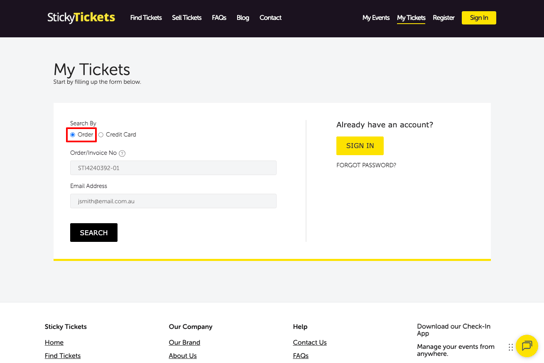
- Enter your Order/Invoice No — for an EFT order, this is your invoice number, not a standard order number (see the difference below).
- Enter the email address you used at checkout.
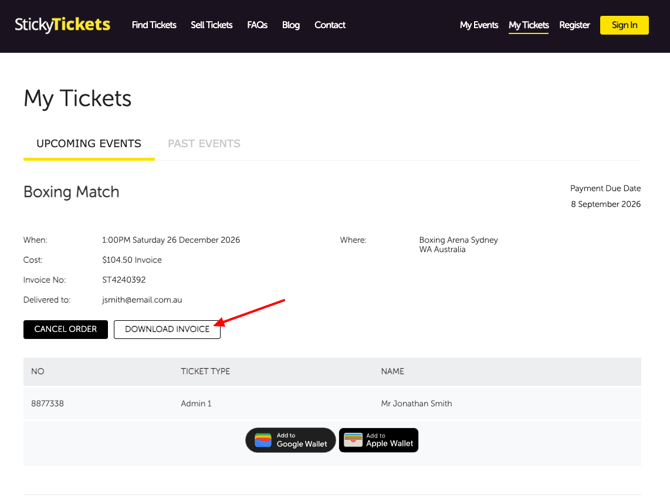
- Select Search. Once your order is found, select Download Invoice to get a copy.
Order number vs. Invoice number
Sticky Tickets uses two different reference formats, depending on whether your payment has been completed:
- Order number — starts with "ST" followed by 7 digits (e.g. ST4240390). This means your order has been paid and confirmed.
- Invoice number — starts with "STI", followed by 7 digits, then "-01" (e.g. STI4240392-01). This is used for orders still awaiting EFT payment.
If you paid by EFT and haven't completed payment yet, use your invoice number to look up your order.
What's on your Invoice
Your invoice includes:
- Invoice/reference number, invoice date, and payment due date
- The organiser's details and your name
- Your event details
- A breakdown of tickets purchased, including price, fees, and total cost
- Amount Paid and Balance Owing
- Bank transfer details for payment
Click here to view an example EFT Invoice
IMPORTANT: Once you've made your payment, email accounts@stickytickets.com.au with your remittance advice — this helps us match your payment to your order and confirm it faster.
Most common scenarios and questions
What happens once my payment is received?
-
You'll receive a new confirmation email with your e-tickets, once your payment has been matched to your order. Allow 1–2 days for funds to be transferred and received.
I want to double-check the bank details before I pay — how can I confirm they're correct?
-
The bank details will always be the same on both your Invoice Order Confirmation email and your downloaded invoice — account name: Sticky Tickets Australia Pty Ltd, along with the BSB and account number. As long as these match across both documents, you can go ahead and pay with confidence. You can also contact the customer support team for this.
What if I don't have my invoice number?
-
Check your Invoice Order Confirmation email first. If you can't find it, use the My Tickets lookup with your email address, or contact our support team with your full name and event details.
Can I use the credit card lookup on My Tickets instead?
-
No — since EFT payments don't use a card, the credit card lookup option won't find your order. Use your invoice number and email address instead.
What happens if I miss the payment due date?
-
Your reserved tickets are released and become available for anyone to purchase. Contact the event organiser as soon as possible if you still want to attend and need an extension.
Can I get an extension on my payment due date?
-
This is at the event organiser's discretion — contact them directly to ask for an extension.
My Invoice Order Confirmation email is missing.
-
Check your spam or junk folder, and make sure you're checking the inbox for the email address used at checkout. If you still can't find it, use the My Tickets lookup or contact our support team with your full name and event details.
I want to double-check the bank details before I pay — how can I confirm they're correct?
-
The bank details on your invoice (account name, BSB, and account number) should always be payable to Sticky Tickets Australia Pty Ltd. If you'd like to verify them before transferring funds, don't use any contact details from the email itself — instead, contact our support team directly through our official website to confirm. This also helps protect you if you ever receive a suspicious or altered invoice.
Need more help?
If you still can't locate your invoice, contact our support team.