---
title: Download event reports and summaries
description: "Purchaser and ticket holder information can be exported in the system before, during, or after your event. You can watch our demo, or follow the steps listed below: 1. Login to your Sticky Tickets"
---
[Skip to content](https://help.stickytickets.com.au/event-reports#main-content)
- [Home](https://help.stickytickets.com.au/)
- [Find Tickets](https://www.stickytickets.com.au/search)
- [Sell Tickets](https://www.stickytickets.com.au/sell-tickets)
- [Contact Us](https://www.stickytickets.com.au/contact-us)
Open main navigation
Close main navigation
- [Home](https://help.stickytickets.com.au/)
- [Find Tickets](https://www.stickytickets.com.au/search)
- [Sell Tickets](https://www.stickytickets.com.au/sell-tickets)
- [Contact Us](https://www.stickytickets.com.au/contact-us)
How can we help?
- There are no suggestions because the search field is empty.
1. [Customer Support Centre](https://help.stickytickets.com.au/?hsLang=en)
2. [Check-In App & POS Device](https://help.stickytickets.com.au/check-in-app-pos-device?hsLang=en)
3. [Post-Event Reports & Downloads](https://help.stickytickets.com.au/check-in-app-pos-device?hsLang=en#post-event-reports-downloads)
# Download event reports and summaries
Purchaser and ticket holder information can be exported in the system before, during, or after your event. You can watch our demo, or follow the steps listed below:
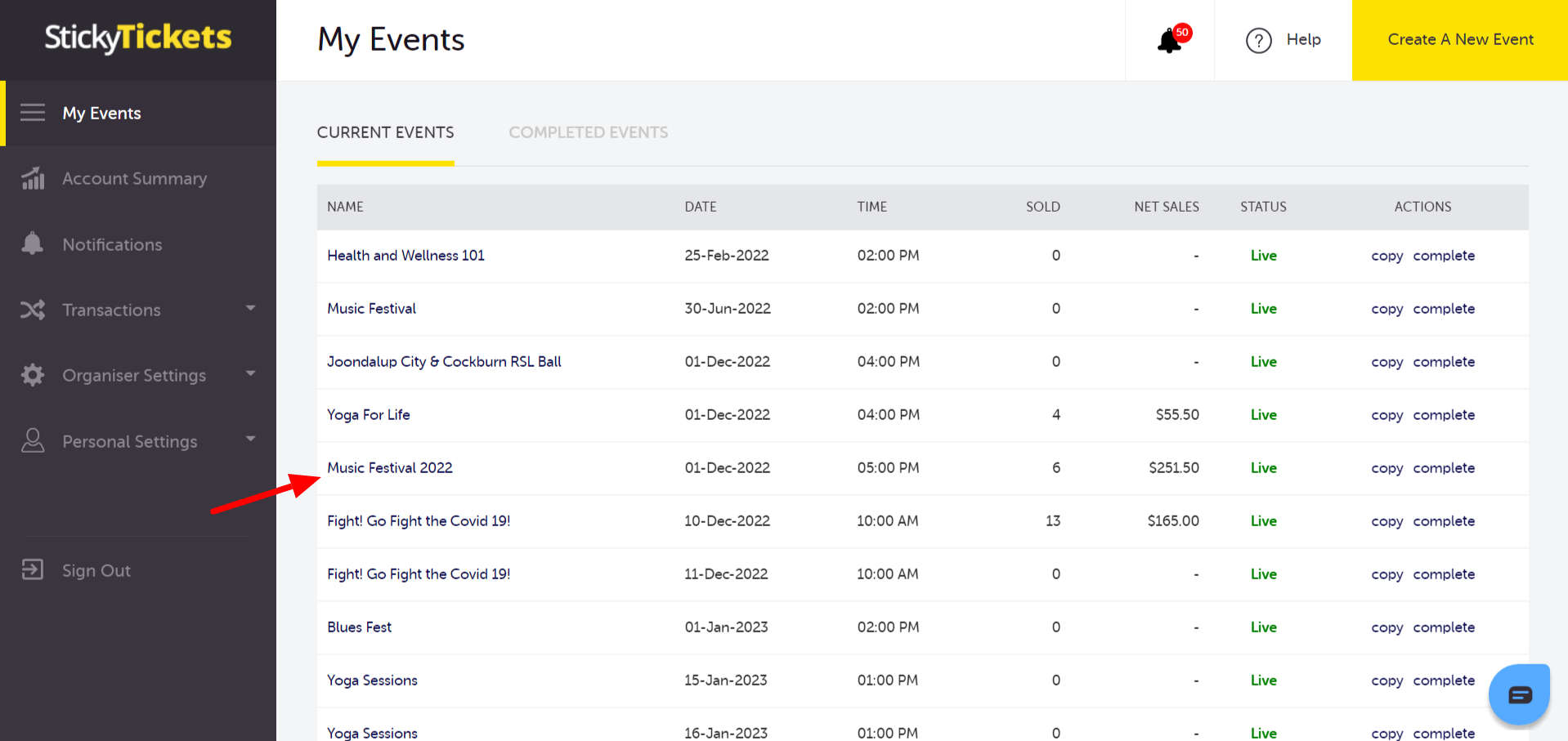
1\. Login to your Sticky Tickets account and go to the My Events tab. Choose the specific event for which you wish to export purchaser and ticket holder information.
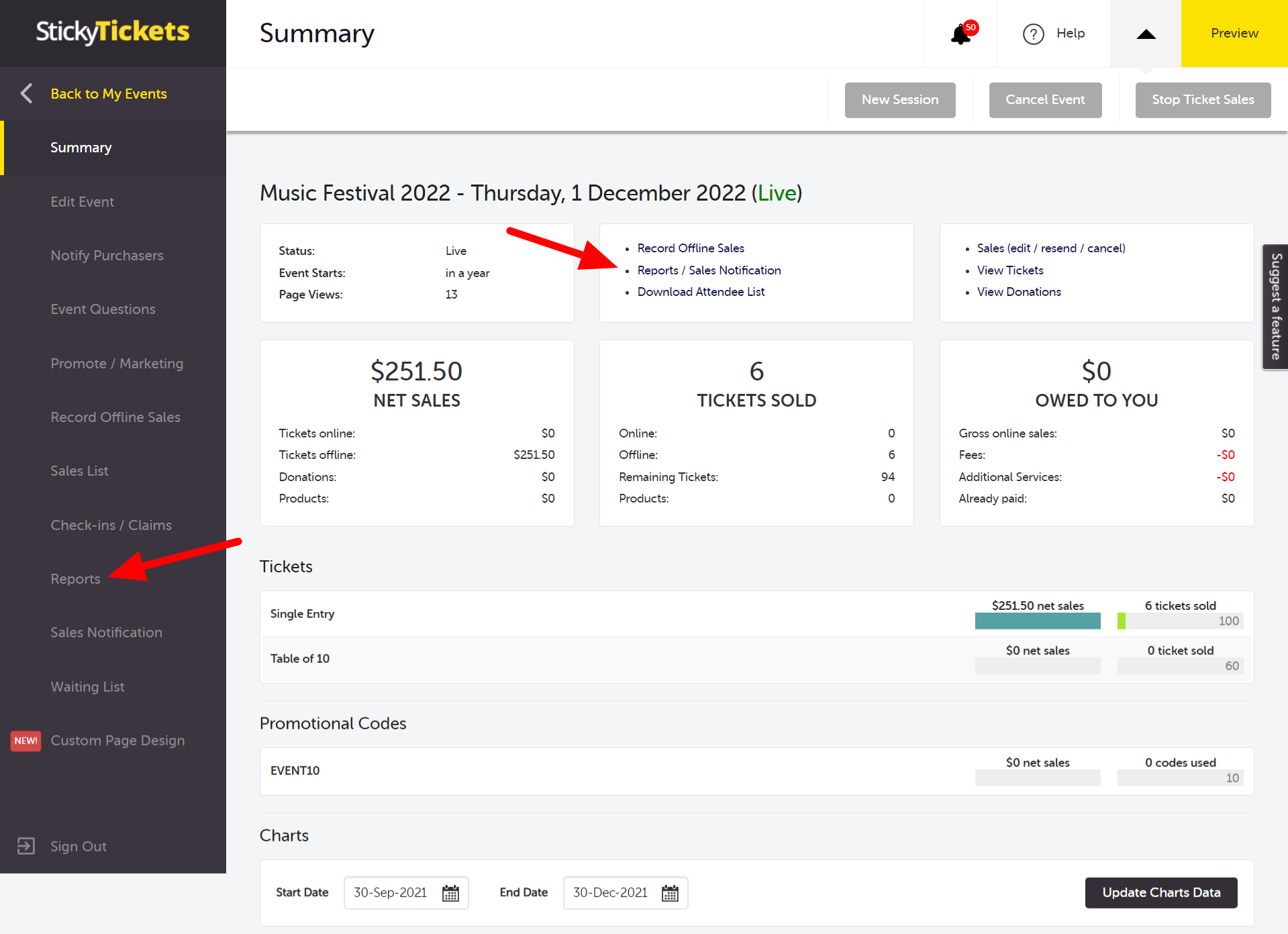
2\. Access the Reports page, available through either the Reports link in the Summary tab or by clicking the Reports tab in the left panel.
3\. The Reports page will show a list of all available reports that you can generate before, during, or after your event. (screenshot updated)
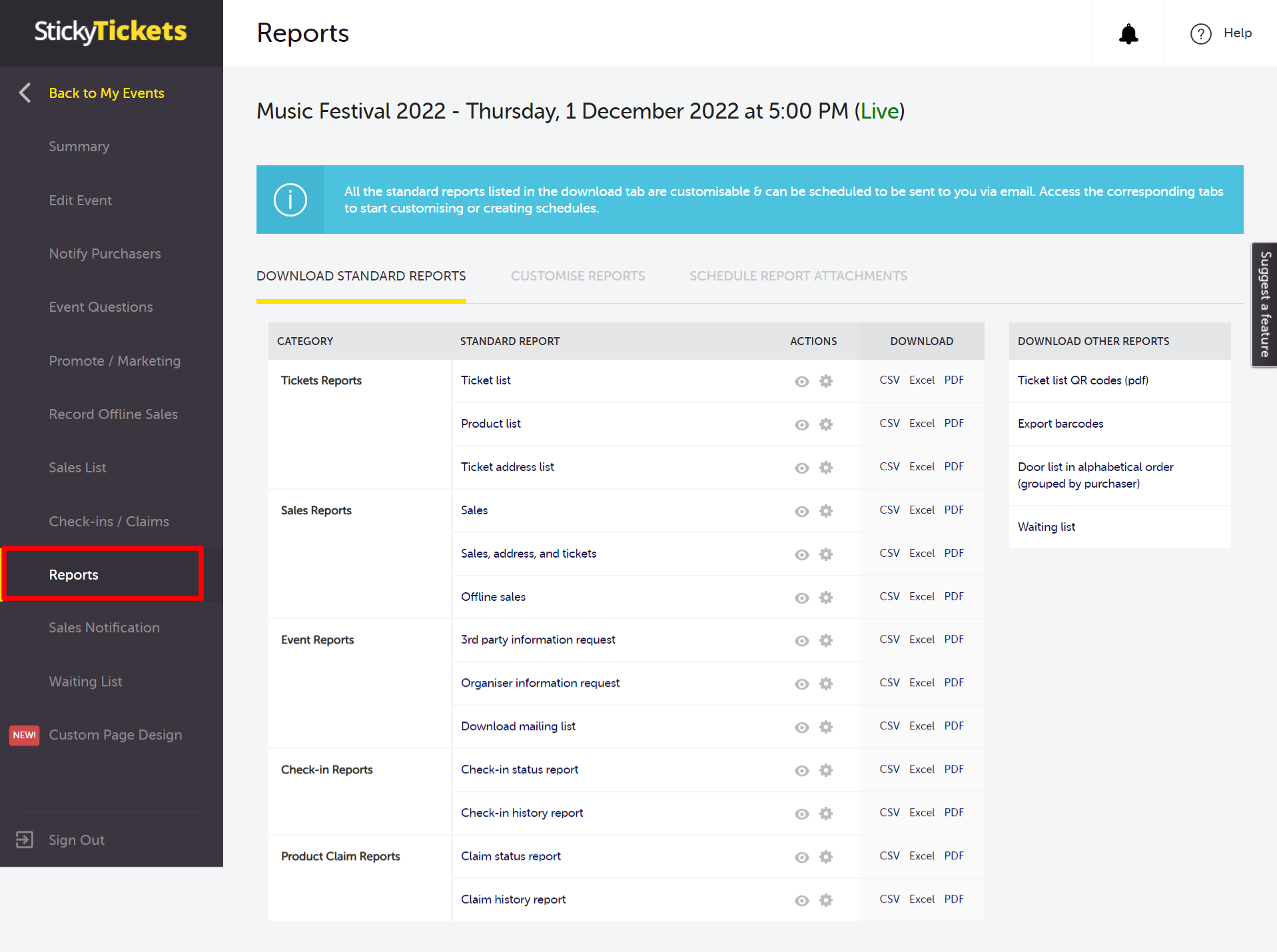
4\. You can generate **Standard Reports** available for download in CSV, Excel, or PDF format.
- **Tickets List** - A comprehensive list of all tickets sold for your event, featuring names and details for each ticket in every order, including responses to custom form questions.
- **Product List -** A compilation of all products (sub-tickets) sold for your event.
- **Ticket Address List** - An organised list of tickets sold, providing address details of the purchaser along with responses to any custom form questions.
- **Sales Report** - A detailed breakdown of sales for your event, inclusive of purchaser details, payment amounts, and GST collected per order.
- **Sales, Address and Tickets** - A combined report encompassing tickets sold, GST collected per order, contact details, purchase specifics, and responses to any custom form questions.
- **Offline Sales** - A report listing all offline sales created for the event.
- **3rd Party Information Request** - A roster of purchasers who have opted-in to be contacted by 3rd party sponsors of the event.
- **Organiser Information Request** - A compilation of purchasers who have opted-in to be contacted by the event organiser.
- **Email List** - A comprehensive list of email addresses for individuals who purchased tickets for your event.
- **Check-In Status Report** - A report detailing the current check-in status, indicating who is checked in and who is checked out, with one line per ticket.
- **Check-In History Report** -A report illustrating each check-in and checkout, providing multiple lines per ticket.
- **Ticket Barcodes** - A compilation of barcodes for all tickets sold in your event.
- **Door List in Alphabetical Order (grouped by purchaser)** - A list of tickets purchased, grouped by purchaser in alphabetical order.
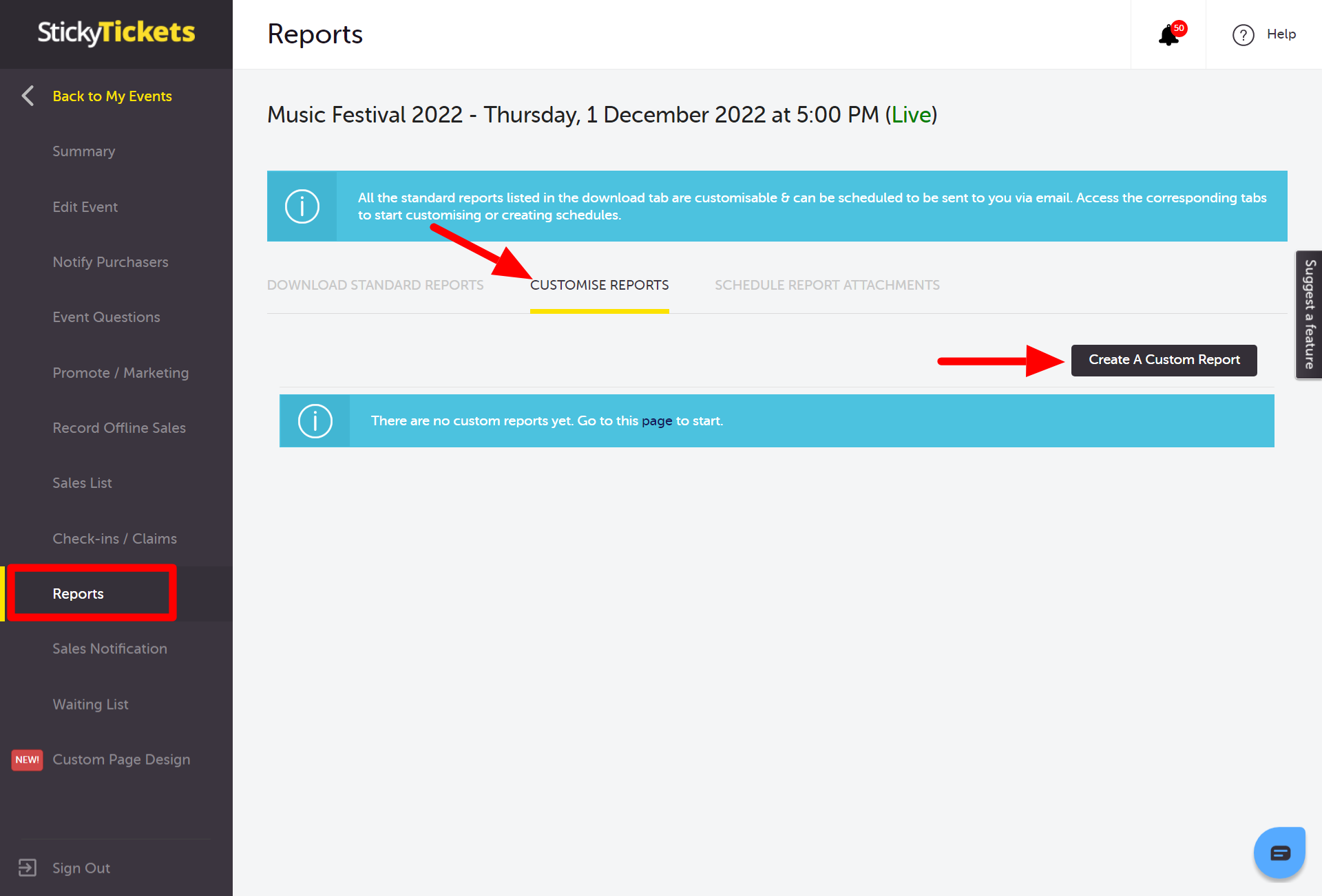
5\. Additionally, you have the flexibility to generate a custom report tailored to your specific requirements. This feature allows you to create a personalised report using the existing standard reports list as a foundation. For detailed information on how to utilise this functionality, please **[click here.](https://help.stickytickets.com.au/how-to-create-custom-reports?hsLang=en)**
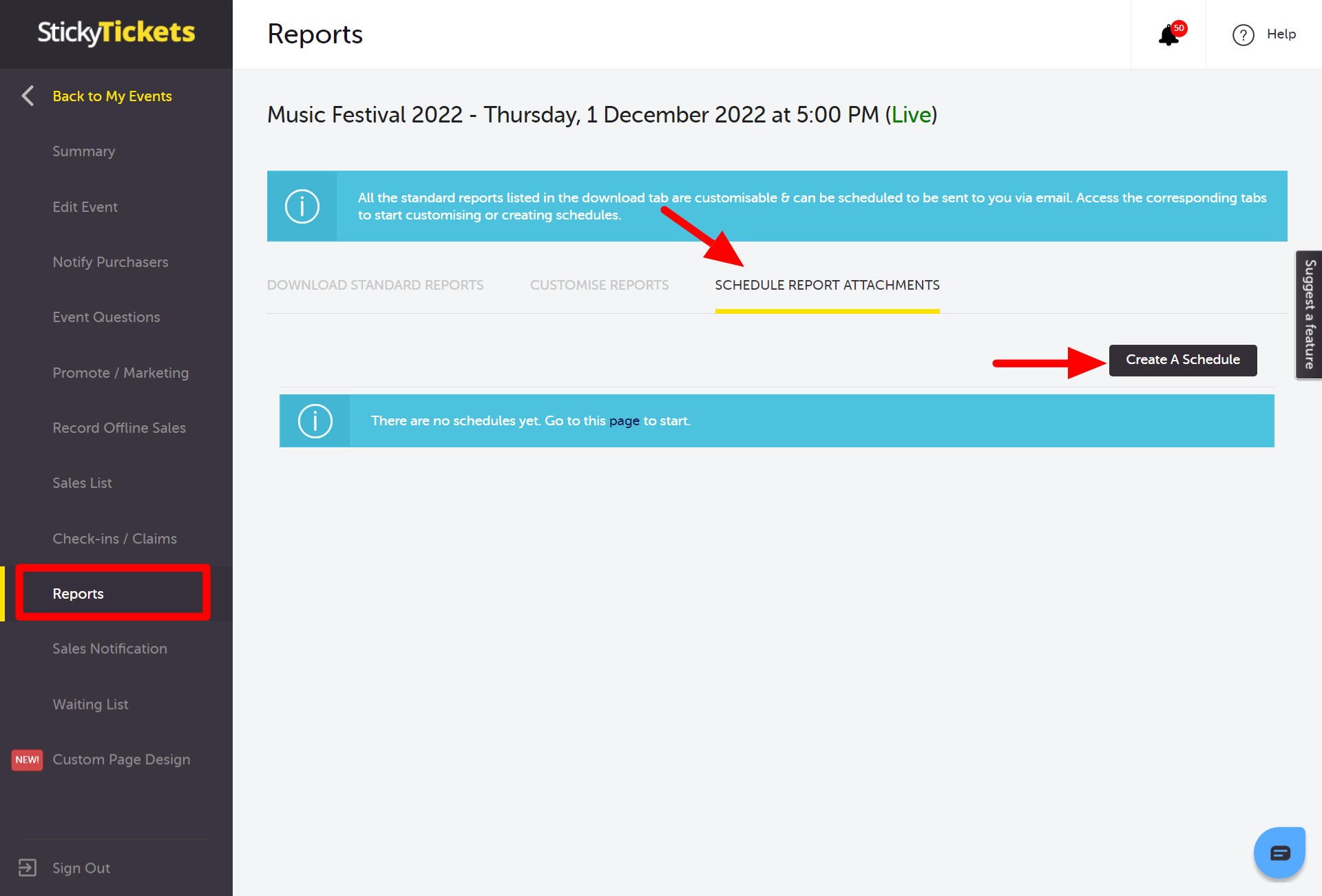
6\. You may also create a schedule report that can be sent to you via email at your preferred time and date (day)
If you have any questions about reports or anything else, please don't hesitate to contact us at support any time and we'd be more than happy to help.
- [Getting Started](https://help.stickytickets.com.au/getting-started?hsLang=en#main-content)
- [About Sticky Tickets](https://help.stickytickets.com.au/getting-started?hsLang=en#about-sticky-tickets)
- [Becoming an Organiser](https://help.stickytickets.com.au/getting-started?hsLang=en#becoming-an-organiser)
- [Costs & Fees](https://help.stickytickets.com.au/getting-started?hsLang=en#costs-fees)
- [Ticket Purchasers](https://help.stickytickets.com.au/ticket-purchasers?hsLang=en#main-content)
- [Buying Tickets](https://help.stickytickets.com.au/ticket-purchasers?hsLang=en#buying-tickets)
- [Accessing Your Account & Tickets](https://help.stickytickets.com.au/ticket-purchasers?hsLang=en#accessing-your-account-tickets)
- [Login & Account Help](https://help.stickytickets.com.au/ticket-purchasers?hsLang=en#login-account-help)
- [Refund and Cancellations](https://help.stickytickets.com.au/ticket-purchasers?hsLang=en#refund-and-cancellations)
- [Event & Organiser Inquiries](https://help.stickytickets.com.au/ticket-purchasers?hsLang=en#event-organiser-inquiries)
- [Selling Tickets](https://help.stickytickets.com.au/ticket-purchasers?hsLang=en#selling-tickets)
- [Event Organisers](https://help.stickytickets.com.au/event-organisers?hsLang=en#main-content)
- [Your Organiser Account](https://help.stickytickets.com.au/event-organisers?hsLang=en#your-organiser-account)
- [Creating & Publishing Events](https://help.stickytickets.com.au/event-organisers?hsLang=en#creating-publishing-events)
- [Editing & Managing Events](https://help.stickytickets.com.au/event-organisers?hsLang=en#editing-managing-events)
- [Tickets, Discounts & Capacity](https://help.stickytickets.com.au/event-organisers?hsLang=en#tickets-discounts-capacity)
- [Promoting Your Event](https://help.stickytickets.com.au/event-organisers?hsLang=en#promoting-your-event)
- [Reporting](https://help.stickytickets.com.au/event-organisers?hsLang=en#reporting)
- [Event Visibility & URLs](https://help.stickytickets.com.au/event-organisers?hsLang=en#event-visibility-urls)
- [Seating Plans](https://help.stickytickets.com.au/event-organisers?hsLang=en#seating-plans)
- [Attendee Management](https://help.stickytickets.com.au/event-organisers?hsLang=en#attendee-management)
- [Refunds, Cancellations & Transfers](https://help.stickytickets.com.au/event-organisers?hsLang=en#refunds-cancellations-transfers)
- [Financials & Getting Paid](https://help.stickytickets.com.au/event-organisers?hsLang=en#financials-getting-paid)
- [Rebates & Charity Programs](https://help.stickytickets.com.au/event-organisers?hsLang=en#rebates-charity-programs)
- [Integrations](https://help.stickytickets.com.au/event-organisers?hsLang=en#integrations)
- [Designing your Organiser & Event Pages](https://help.stickytickets.com.au/event-organisers?hsLang=en#designing-your-organiser-event-pages)
- [Troubleshooting & Errors](https://help.stickytickets.com.au/event-organisers?hsLang=en#troubleshooting-errors)
- [Check-In App & POS Device](https://help.stickytickets.com.au/check-in-app-pos-device?hsLang=en#main-content)
- [About the Check-In App](https://help.stickytickets.com.au/check-in-app-pos-device?hsLang=en#about-the-check-in-app)
- [Setting Up for Event Day](https://help.stickytickets.com.au/check-in-app-pos-device?hsLang=en#setting-up-for-event-day)
- [Using the App at Your Event](https://help.stickytickets.com.au/check-in-app-pos-device?hsLang=en#using-the-app-at-your-event)
- [Post-Event Reports & Downloads](https://help.stickytickets.com.au/check-in-app-pos-device?hsLang=en#post-event-reports-downloads)
- [POS Device](https://help.stickytickets.com.au/check-in-app-pos-device?hsLang=en#pos-device)
- [Policy Pages/Updates](https://help.stickytickets.com.au/policy-pages-updates?hsLang=en#main-content)
- [Recent Policy Changes](https://help.stickytickets.com.au/policy-pages-updates?hsLang=en#recent-policy-changes)
- [Current Policies](https://help.stickytickets.com.au/policy-pages-updates?hsLang=en#current-policies)
- [Social Media](https://help.stickytickets.com.au/social-media?hsLang=en#main-content)
- [Social Media Accounts](https://help.stickytickets.com.au/social-media?hsLang=en#social-media-accounts)
- [Sticky Tickets](https://www.stickytickets.com.au/)
- [About Us](https://www.stickytickets.com.au/about-us)
- [Blogs](https://blog.stickytickets.com.au/)
- [Privacy](https://www.stickytickets.com.au/privacy)
- [Our Brand](https://www.stickytickets.com.au/branding)
[mailto:support@stickytickets.com.au](mailto:support@stickytickets.com.au)
Copyright © 2026, stickytickets.com.au