You can customise the text labels shown next to your event's date and time on your event page. For example, you can change "Start Time" to "Doors Open", "Showtime", or "Session starts" — whatever best matches your event's style.
Important: Each label is limited to 20 characters. Changes affect how the information is displayed only — they do not affect ticket timing, sale windows, or when the event starts.
How to update your event date and time labels
Step 1 — Open your event editor
- Log in to your Sticky Tickets organiser account.
- Go to My Events and click the name of the event you want to edit.
- Click the Edit Event tab.
Step 2 — Open the Date settings
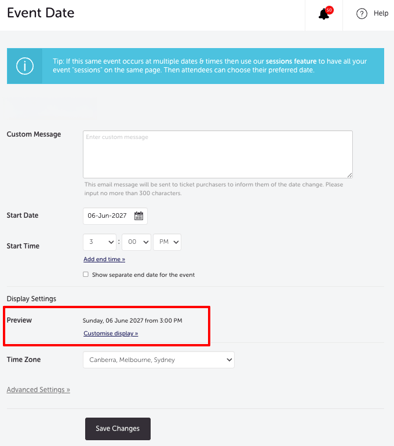
- Scroll to the Date section and click the Edit button.
- Inside the Date settings, scroll down to the Display Settings section.
- Click the Customise Display link.
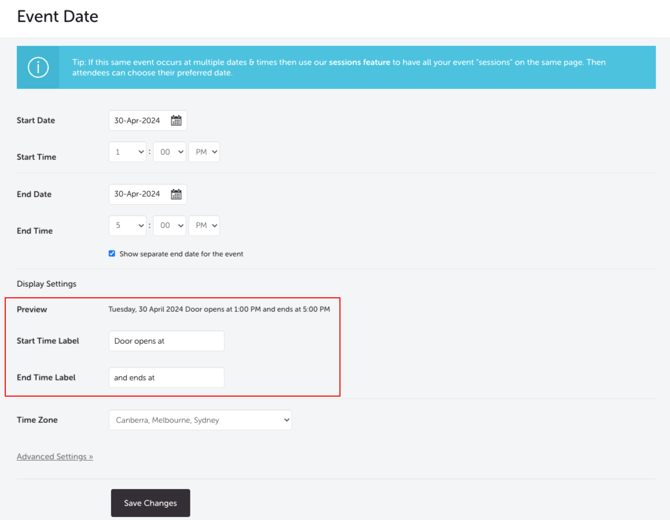
- Enter your preferred label text in each field (maximum 20 characters each). Examples:
- Start time label: Doors Open / Session starts / Showtime / Kick-off.
- End time label: Finish / Wrap-up / End time.
- Check the Preview field to see exactly how your labels will appear on the event page before saving.
Step 3 — Save your changes
Click Save. Your updated labels will appear on your event page immediately.
Most common scenarios and questions
I can't find the Customise Display link.
-
Make sure you've clicked the Edit button in the Date section first — the Display Settings area and Customise Display link only appear inside the expanded Date settings, not on the main event editor page. Scroll down within the Date settings if you don't see it immediately.
My label isn't showing on the event page after saving.
-
Refresh your event page. If the label still hasn't updated, return to the Date settings and confirm the changes were saved — look for a save confirmation or check that your new text appears in the Display Settings section.
My label is being cut off. Each label has a 20-character limit including spaces.
-
Count your characters before saving — if your preferred label is too long, try a shortened version (e.g. "Doors open at" → "Doors open").
Which labels can I customise?
-
You can customise two labels: the word "from" that appears before the start time, and the word "to" that appears before the end time. For example, you could change "from" to "Doors open" and "to" to "Finish"
Will changing the label affect my ticket timing or sale windows?
-
No — these labels only control how information is displayed on the event page. They have no effect on when ticket sales open or close, or on the event's start time in the system.
Do the customised labels appear anywhere other than the event page?
-
No — customised labels only appear on your event page. They do not appear in confirmation emails, e-tickets, or calendar entries.
Can I leave a label blank to hide it?
-
Leaving a label field blank will not hide it — a default value of "to" will appear between the start and end time instead. If you want a specific label displayed, make sure to enter your preferred text.
Need more help?
If you need help finding or using these settings, contact our support team.