Secure My Refund can only be turned off when your event's refund timeframe is set to 1, 2, or 3 days. For all other refund timeframes, Secure My Refund is locked on and can't be disabled.
| Refund timeframe | Secure My Refund |
| No Refund | Locked on. Cannot be changed. |
| 1–3 days | Organiser can turn it on or off. |
| 4+ days | Locked on. Cannot be changed. |
How to turn off Secure My Refund
There are two ways to do this — both require your refund timeframe to be set to 1, 2, or 3 days.
Via your Organiser Refund Policy
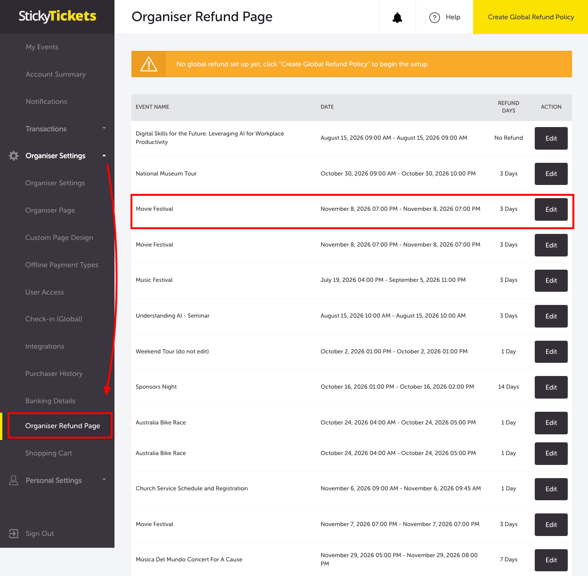
- Log in to your account and, in the left panel, go to Organiser Settings > Organiser Refund Page.
- Select Set Up Refund Policy in the upper right corner.
- Under Select No. of Days for Refund, choose 1, 2, or 3 days. This makes the Secure My Refund checkbox available to toggle.
- Uncheck the Secure My Refund checkbox to turn it off for ticket purchasers.
- Scroll down, select the event(s) you want this to apply to, and select Save Changes.
Via the Edit Event page
- Log in to your account and, from My Events, select your event.
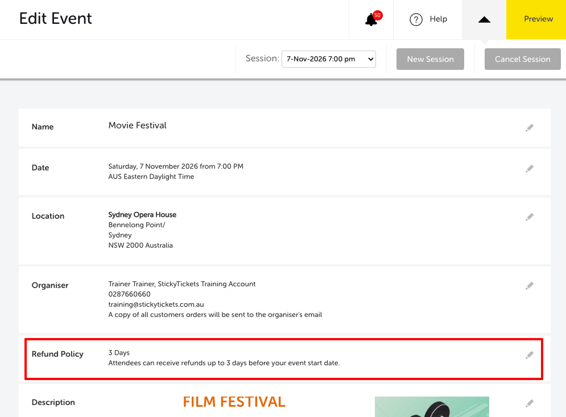
- In the left panel, go to Edit Event and scroll to the Refund Policy settings.
- Under Select No. of Days for Refund, choose 1, 2, or 3 days. This makes the Secure My Refund checkbox available to toggle.
- Uncheck the Secure My Refund checkbox to turn it off.
Most common scenario and question
Why can't I turn off Secure My Refund on my event?
-
Secure My Refund is locked on when your refund timeframe is set to No Refund or 4 or more days. It's only optional when the timeframe is set to 1, 2, or 3 days.
If I turn it off for a 1–3 day policy, does it stay off if I change the timeframe later?
-
No — if you later change your refund timeframe to No Refund or 4+ days, Secure My Refund will automatically lock back on.
Need more help?
If you have any questions about requesting a refund or Secure My Refund, contact our support team.