Sticky Tickets supports raffle and giveaway events. This guide explains how to create your event and set up tickets in the most cost-effective way for your supporters.
Why Group Tickets are recommended for raffles
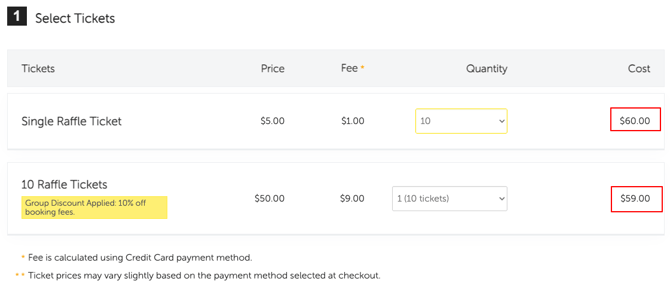
Raffle supporters often buy multiple tickets at once. With Single Tickets, a separate booking fee applies to every ticket purchased. With a Group Ticket bundle, one booking fee covers the whole bundle and a 10% group discount is automatically applied — reducing the total fee for your supporters.
Example A — 10 raffle tickets at $5 each
| 10 × Single Tickets | Group Ticket bundle of 10 | |
|---|---|---|
| Per ticket price | $5.00 | $50 (bundle price for 10 tickets) |
| Booking fee | $1.00 each ($0.01–$9.99 tier) | $1.00 × 10 = $10.00, less 10% = $9.00 total |
| Total booking fee | $10.00 | $9.00 |
| Fee per raffle ticket | $1.00 | $0.90 |
| Total cost to buyer | $60.00 | $59.00 |
| Saving per bundle | — | $1.00 |
Example B — 10 raffle tickets at $10 each (saving grows with ticket price)
| 10 × Single Tickets | Group Ticket bundle of 10 | |
|---|---|---|
| Per ticket price | $10.00 | $10.00 (bundle total: $100) |
| Booking fee | $1.50 each ($10–$24.99 tier) | $1.50 × 10 = $15.00, less 10% = $13.50 total |
| Total booking fee | $15.00 | $13.50 |
| Fee per raffle ticket | $1.50 | $1.35 |
| Total cost to buyer | $115.00 | $113.50 |
| Saving per bundle | — | $1.50 |
Set up your Group Ticket
-
From My Events, open your event and click Edit Event.
-
Scroll to the Tickets section and click Add Another Ticket (or Create Your First Ticket if none exist yet).
-
Select Group Ticket as the ticket type.
-
Complete the fields using the guide below, then click Save Changes.
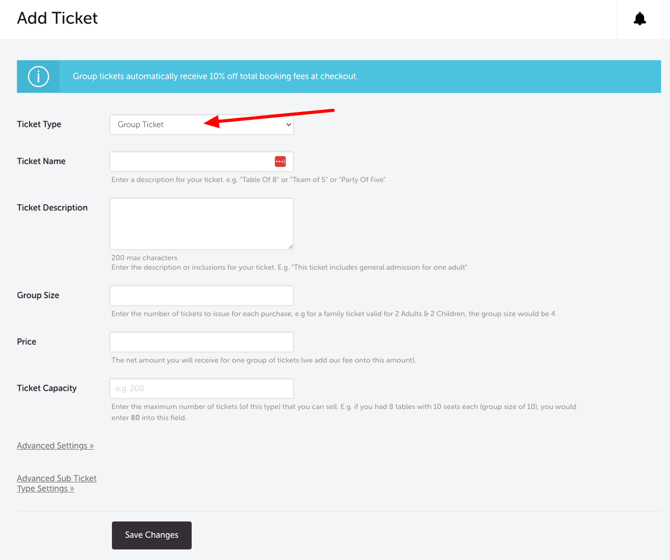
Ticket Field Settings Guide for Raffle
| FIELD | WHAT TO ENTER | EXAMPLE |
|---|---|---|
| Ticket Name | State the number of entries so buyers know what they're purchasing | "10 Raffle Tickets" or "Book of 10 Entries" |
| Group Size | Number of individual raffle tickets in the bundle | 10 |
| Bundle Price | Individual ticket price × group size | $50.00 (10 × $5) |
| Ticket Capacity | Total individual raffle tickets available — not number of bundles. Example: 500 tickets ÷ 10 per bundle = 50 bundles, but enter 500. | 500 |
| Ticket Description | Optional — include draw date, prize details, or terms | "Includes 10 entries in the prize draw on 1 July." |
| Stop Selling Date | Set before the draw closes to prevent late purchases | 30 June at 11:59 PM |
Offering multiple bundle sizes
Many raffles offer a range of bundle sizes. Create a separate Group Ticket type for each — all receive the 10% discount automatically.
| Ticket name | Group size | Bundle price | Booking fee | Fee per ticket |
|---|---|---|---|---|
| 5 Raffle Tickets | 5 | $25 | $1 × 5 = $5, less 10% = $4.50 | $0.90 |
| 10 Raffle Tickets | 10 | $50 | $1 × 10 = $10, less 10% = $9 | $0.90 |
| 20 Raffle Tickets | 20 | $100 | $1 × 20 = $20, less 10% = $18 | $0.90 |
NEED MORE HELP?
If you have questions about raffle ticketing or setting up Group Tickets, please contact our support team.